
Large Language Models (LLMs) have become very good at understanding questions and generating human-like responses. However, they have one limitation: they do not automatically have access to every piece of information you might need them to use.
For example, imagine you have an organisation with thousands of internal documents. These documents contain information about company policies, employee records, financial reports and other important matters. A general-purpose AI model may not know anything about these documents.
So how do we give an AI model access to information that it was not originally trained on?
This is where Retrieval-Augmented Generation (RAG) comes in.
Before diving into the technical details, let's understand the idea through a familiar example.
Imagine you're an experienced mechanic who has been repairing cars for many years. Over time, you've also collected many books and guides about different cars, their parts and how to fix various problems.
You have books covering engines, brakes, electrical systems, cooling systems and many other areas. You keep them organised so that you can easily find information whenever you need it.
One day, a customer brings in a relatively new car model with an unusual problem. The car starts normally, but after driving for a few minutes, the engine begins overheating.
You understand how engines work, but you haven't dealt with this particular model or this exact problem before.
You know what you're looking for, so you consult your collection of books and guides.
You find several sections discussing engine overheating. Some explain problems with the cooling system, others discuss faulty thermostats, radiator problems and coolant leaks.
You go through the information and identify the parts that are most useful for understanding this particular problem.
You bring the relevant information together, consider the problem you're dealing with and use what you've found to determine the possible causes.
You now have a clearer understanding of the problem and can explain to the customer what might be wrong and what needs to be checked.
The important idea is that you don't have to remember everything. You have a collection of knowledge that you can refer to whenever you encounter a problem. You find what is relevant to the situation and use it to arrive at a useful answer.
This is essentially the idea behind RAG. Instead of expecting an AI model to have all the information it needs, we give it access to an external collection of information. Whenever a question comes in, we retrieve the relevant information and provide it to the model to help it generate an answer.
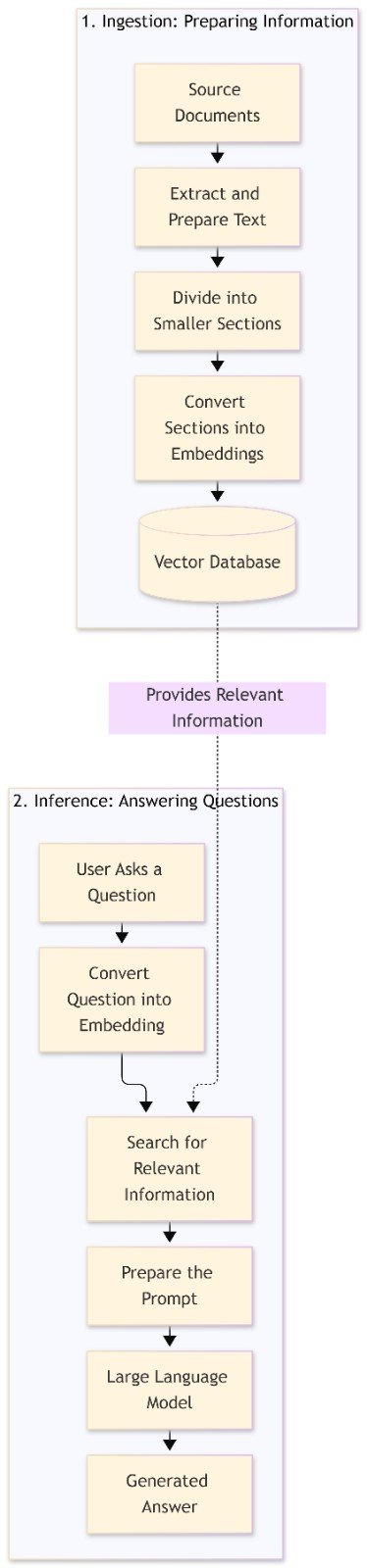
Retrieval-Augmented Generation (RAG) is an approach that combines information retrieval with the text-generation capabilities of a Large Language Model (LLM).
Let's break down this definition:
Retrieval means finding relevant information from an external knowledge source. This could be a collection of documents, company records, manuals or other information.
Augmented means adding the retrieved information to the input given to the language model. This gives the model additional context that it can use when answering a question.
Generation refers to the process where the language model uses the available information to produce a response.
In simple terms, RAG allows us to retrieve relevant information from an external source, provide that information to an LLM, and use the LLM to generate an answer.
One important thing to understand is that RAG does not retrain the language model every time someone asks a question. Instead, the information is prepared and stored separately. When a question comes in, relevant information is retrieved and supplied to the model.
Let's look at how this works.
RAG has two main stages:
- Ingestion
- Inference
The ingestion stage involves preparing the information before it can be retrieved. The inference stage happens when someone asks a question and we need to generate a response.
Let's understand each stage.
Imagine you have a collection of documents containing information that you want an AI model to use when answering questions.
These documents could be PDF files, Word documents, company policies, technical manuals or other sources of information.
We need to prepare this information before we can use it.
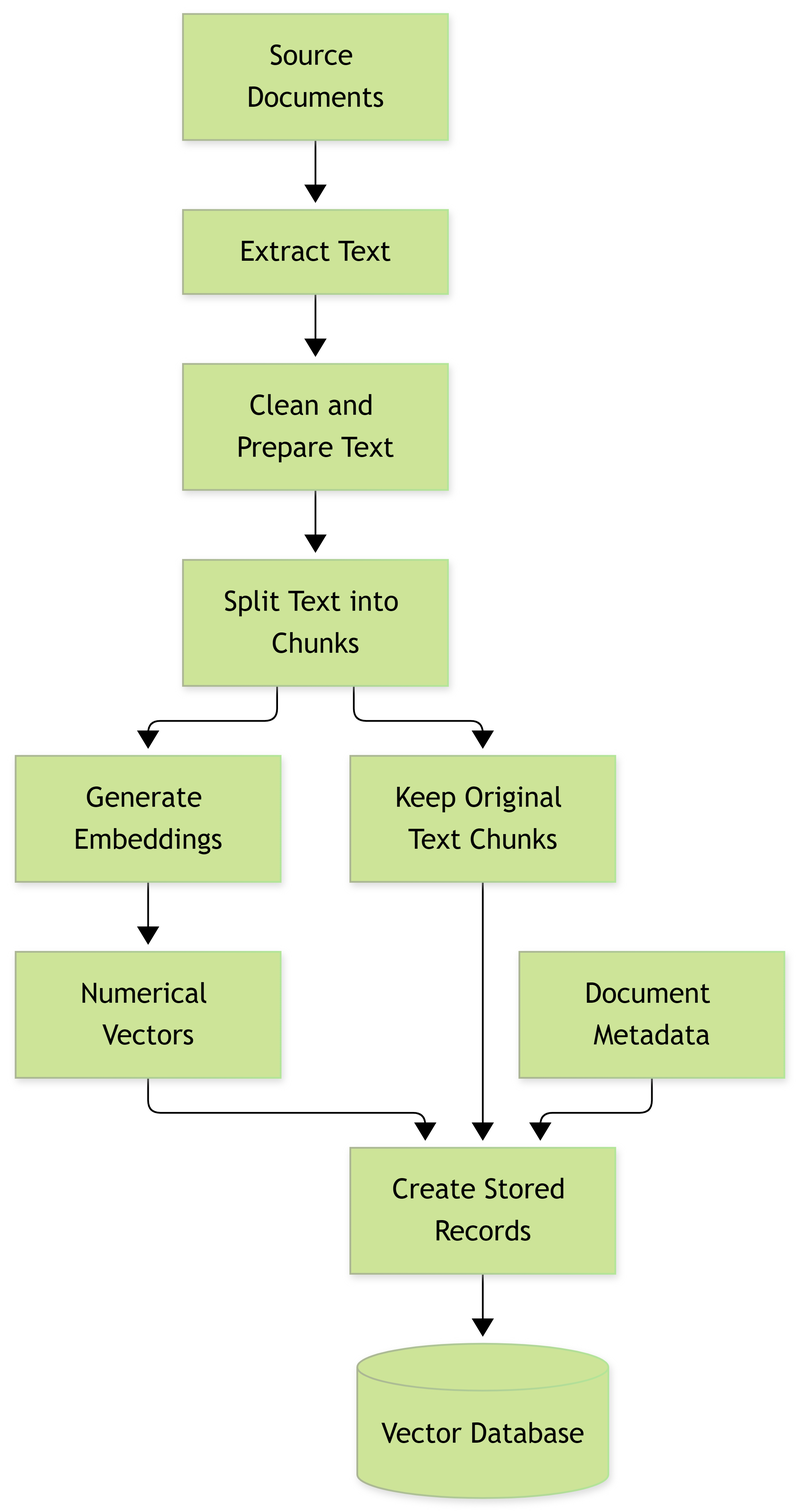
Step 1: Preparing the Data
The first thing we need to do is make the information available for processing.
For example, if we have PDF documents, we need to read their contents and obtain the text. The same applies to Word documents and other supported formats.
For scanned documents, we may need Optical Character Recognition (OCR) to recognise the text contained in the images.
We may also need to clean the information by removing unnecessary content, correcting formatting problems and handling other inconsistencies.
This process is commonly referred to as data extraction and preparation.
Step 2: Chunking
Now, imagine you have a document containing 200 pages. It covers different topics, and you want to make it easier to find specific information.
Rather than treating the entire document as one large piece of information, you divide it into smaller sections.
For example, a document about employment policies might contain:
- Employee recruitment
- Working hours
- Annual leave
- Maternity leave
- Employee termination
You can divide the document into smaller sections based on these topics.
These smaller sections are what we call chunks.
Chunking is the process of splitting large documents into smaller pieces of text that can be retrieved independently.
Why is this important?
When someone asks about maternity leave, we don't necessarily need to retrieve the entire 200-page document. We only need the sections that contain information relevant to maternity leave.
There are different ways of creating chunks.
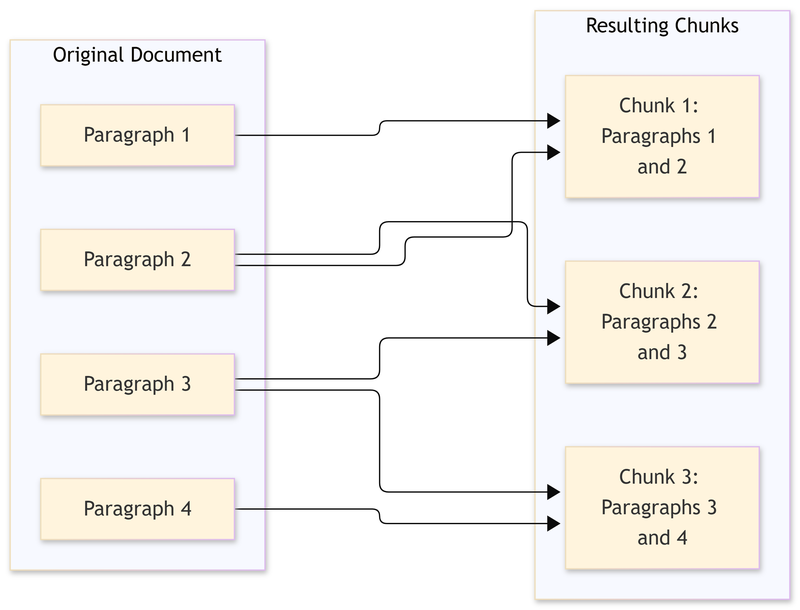
Fixed-size chunking: Here, we divide the text based on a specified number of characters or tokens. For example, each chunk might contain 500 tokens.
Semantic chunking: Here, we divide the text based on its meaning. We try to keep related sentences and paragraphs together rather than splitting the text at arbitrary points.
We can also use overlapping chunks. This means that part of one chunk is repeated in the next chunk. Overlapping helps preserve information when an important explanation crosses the boundary between two chunks.
Choosing the right chunk size matters. Very large chunks may contain information that is not relevant to a question. Very small chunks may lose important context.
Step 3: Embeddings
Now that we have divided our documents into smaller sections, we need a way of representing their meaning numerically.
Remember that computers work with numbers. So how do we represent a piece of text in a way that allows us to identify other pieces of text with similar meanings?
This is where embeddings come in.
An embedding is a numerical representation of information. In our case, we use an embedding model to convert each text chunk into a list of numbers called a vector.
The interesting thing about embeddings is that pieces of text with similar meanings tend to have numerical representations that are close to each other in the embedding space.
For example, consider these two statements:
- An employee is entitled to annual leave.
- Workers have a right to take paid time off each year.
The wording is different, but the two statements discuss a similar subject.
An embedding model is trained to capture these relationships so that their numerical representations can be close to each other.
This makes it possible to search for information based on meaning rather than relying entirely on matching exact words.
One important clarification: an embedding model is not necessarily a Large Language Model. Both may use transformer architectures, but an embedding model is specifically designed to turn information into numerical representations. It does not need to generate paragraphs or conversations.
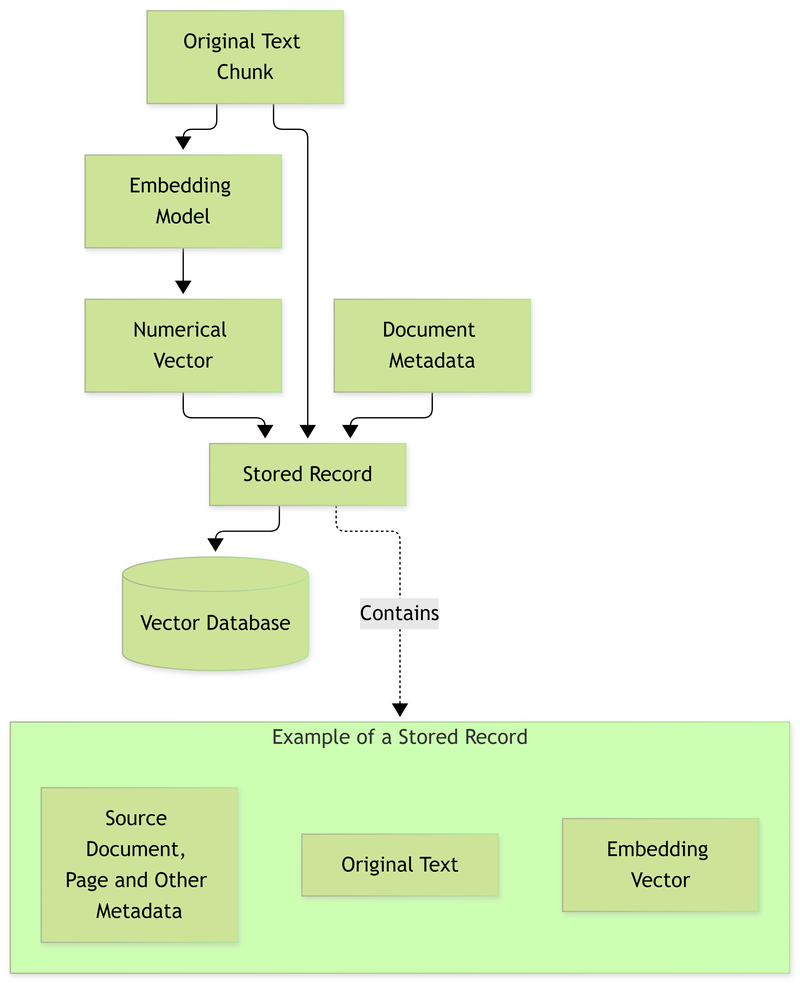
Step 4: Storing Embeddings in a Vector Database
We now have our text chunks and their numerical representations.
But where do we store them?
This is where a vector database comes in.
A vector database is a type of database designed to store and search numerical vectors efficiently.
Unlike a traditional relational database, where information is commonly organised into tables with rows and columns, a vector database is designed to work with numerical representations of information.
For example, each stored record can contain:
- The numerical representation of a text chunk.
- The original text.
- The document it came from.
- Additional information such as the page number, date or document category.
Keeping the original text is important. Remember, the numerical representation helps us find relevant information, but we still need the original text to provide useful context to the language model.
At this point, we have completed the ingestion stage.
Our information has been prepared, divided into smaller sections, converted into numerical representations and stored for future retrieval.
Now that our information is ready, we can move to the second stage.
Imagine someone asks:
"What is the company's policy on maternity leave?"
We need to find the relevant information and use it to generate an answer.
Let's see how this happens.
Step 1: Converting the Query into an Embedding
The first thing we do is take the question and convert it into a numerical representation.
This is similar to what we did during ingestion when we converted our document chunks into embeddings.
We use an embedding model to turn the question into a vector.
An important point to remember is that we generally use the same embedding model for both the documents and the questions. This is because their numerical representations need to be compatible for meaningful comparisons.
There are specialised models that use separate methods for processing documents and queries, but these are specifically designed to work together in the same representation space.
You generally cannot take embeddings produced by two unrelated models and expect them to work together correctly.
Step 2: Searching for Relevant Information
We now have the numerical representation of the question.
Remember that we also have the numerical representations of all our document chunks stored in the vector database.
We can now compare the question's representation with the stored representations to find information that is most closely related to the question.
This is what we call vector search.
There are different ways of searching for information:
Semantic Search
Semantic search looks for information based on meaning rather than relying only on matching exact words.
For example, someone might ask, "How much time can an employee take off after having a baby?"
The relevant document might use the phrase "maternity leave entitlement."
Even though the wording is different, the two phrases discuss the same subject. Semantic search helps us find that relationship.
Keyword Search
Keyword search looks for matching words or phrases.
For example, if someone searches for "maternity leave", the search looks for documents containing those words.
This is useful when exact terms, names or specific phrases matter.
Hybrid Search
Hybrid search combines keyword search and semantic search.
This is useful because some questions require us to understand the meaning of a sentence, while others require us to find exact words or terms.
One small distinction: embeddings are generally represented as fixed-length numerical vectors. Fixed length describes the structure of the vector, not a separate search method.
Once the search is complete, we retrieve the most relevant chunks from the database.
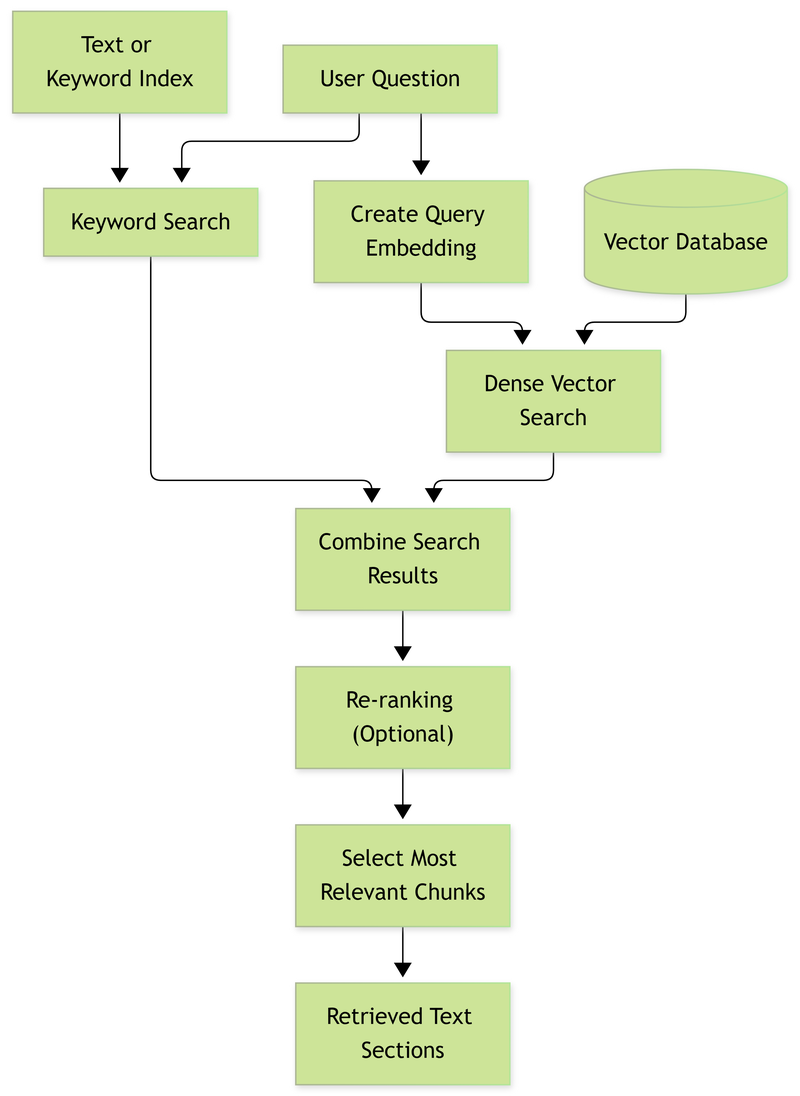
Step 3: Re-ranking
After performing our initial search, we might have several chunks that are related to the question.
However, not all of them are equally relevant.
For example, we might retrieve ten chunks discussing employee benefits, annual leave, maternity leave and other employment policies.
We want to identify the chunks that best answer the question.
This is where re-ranking comes in.
Re-ranking is the process of evaluating retrieved information and rearranging it according to its relevance to the original question.
Unlike the initial search, which helps us find potentially relevant information, a re-ranking model examines the relationship between the question and each retrieved chunk more closely.
It then gives the chunks relevance scores and ranks them accordingly.
For example, if the initial search returns ten chunks, the re-ranking process might identify the three most useful ones.
Re-ranking is optional. Some simple RAG implementations proceed directly from retrieval to prompt construction.
Step 4: Prompt Construction
We now have the information that we need.
But how do we give this information to the language model?
This is where prompt construction comes in.
Remember that a Large Language Model generates responses based on the information and instructions provided to it.
We therefore need to prepare a prompt containing the relevant information, the original question and instructions on how the model should respond.
Let's use an example.
System Instructions
You are an assistant that answers questions using the supplied company documents.
- Use simple and understandable language.
- Do not invent information.
- Base your answers on the supplied documents.
- If the information is not available, explain that it cannot be found in the supplied documents.
Retrieved Information
Document: Employee Handbook
Page 15:
Employees are entitled to 90 calendar days of maternity leave, subject to the applicable conditions outlined in the company policy.
User Question
What is the company's maternity leave policy?
Notice that we have provided the model with three things:
- Instructions on how it should behave.
- Relevant information retrieved from our documents.
- The original question.
The instructions are commonly provided through what we call a system prompt. A system prompt defines how the model should behave when generating responses.
For example, you can instruct the model to use simple sentences, avoid certain words, provide answers in a particular format or refrain from making claims that are not supported by the supplied information.
An important distinction is that the retrieved information is context, not necessarily part of the system prompt itself. In many implementations, the system instructions and retrieved context are provided in separate sections of the model's input.
The purpose is to give the model enough information and clear instructions to generate an appropriate response.
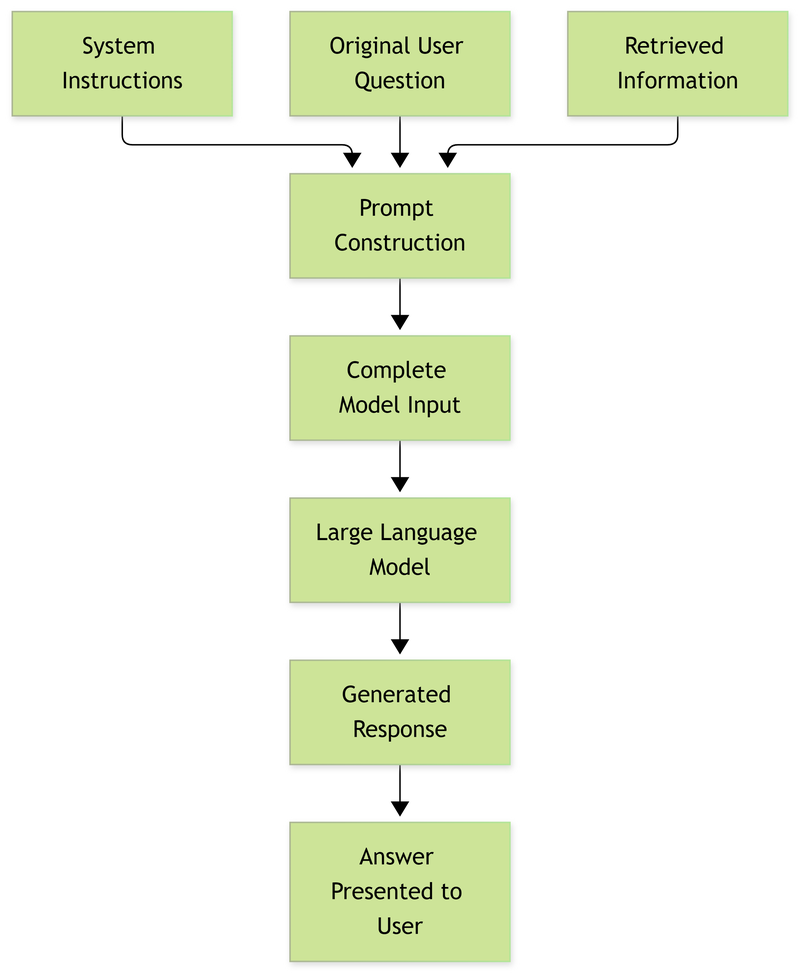
Step 5: Generation
We now have everything ready.
The language model receives the instructions, the retrieved information and the original question.
It uses these to formulate a response.
This is what we call generation.
The model does not simply copy and paste the retrieved information. It uses the information to produce a response that addresses the question.
For example:
"According to the company handbook, employees are entitled to 90 calendar days of maternity leave, subject to the applicable conditions outlined in the policy."
This is the final response presented to the user.
We have now covered both stages of RAG.
Let's summarise the entire process.
Ingestion
- Data preparation: Collecting and preparing documents so their contents can be processed.
- Chunking: Dividing large documents into smaller sections.
- Embeddings: Converting each section into a numerical representation.
- Vector database: Storing the numerical representations alongside the original text and relevant information.
Inference
- Query embedding: Converting the user's question into a numerical representation.
- Vector search: Finding document sections that are related to the question.
- Re-ranking: Prioritising the most relevant retrieved sections.
- Prompt construction: Combining the instructions, retrieved information and original question.
- Generation: Using the Large Language Model to formulate the final response.
There are a few important things worth understanding when working with RAG.
- RAG does not eliminate hallucinations.
Although RAG gives a language model access to relevant information, it does not guarantee that every response will be correct.
For example, the system might retrieve the wrong document sections. The retrieved information might also be incomplete or outdated. The language model might then generate an inaccurate response.
This is why the quality of the retrieved information matters.
- The quality of your data matters.
If your original documents contain incorrect information, poorly written explanations or outdated policies, the model can still produce incorrect answers.
RAG does not automatically correct the information you provide.
- Chunking matters.
If your chunks are too large, the retrieved information may contain unnecessary content. If they are too small, important information may lose its surrounding context.
You need to choose a chunking strategy that works well with the type of documents you're processing.
- You need to protect your data.
If your RAG system contains confidential company documents, you must ensure that users can only retrieve information they are authorised to access.
For example, an employee should not automatically gain access to confidential management records simply because those records exist in the same vector database.
- RAG does not mean the model is being retrained.
This is probably one of the most important things to remember.
During ingestion, we prepare and store information externally. During inference, we retrieve relevant information and provide it to the language model.
The model does not need to be retrained whenever new documents are added. We simply prepare and index the new information so that it becomes available for future searches.
Retrieval-Augmented Generation (RAG) provides a way of giving Large Language Models access to information beyond what they learned during their original training.
Instead of expecting a model to know everything, we maintain an external collection of information that can be searched whenever a question arises.
We prepare this information during ingestion, retrieve relevant sections during inference, and provide them to the language model to generate a response.
The fundamental idea is simple: find the relevant information first, then use it to generate an answer.
No comments yet
Be the first to share your thoughts on this article!