You know the concepts—authentication, callbacks, CheckoutRequestID. Now let's build it. This guide walks through complete M-Pesa integration using Python and Flask with real, production-ready code. No shortcuts, no hand-waving. Just working implementation.
We're building the same movie ticket booking system from the conceptual guide, but now you'll see exactly how every piece translates into working code. By the end, you'll have a fully functional M-Pesa integration you can adapt to any project.
Let's build.
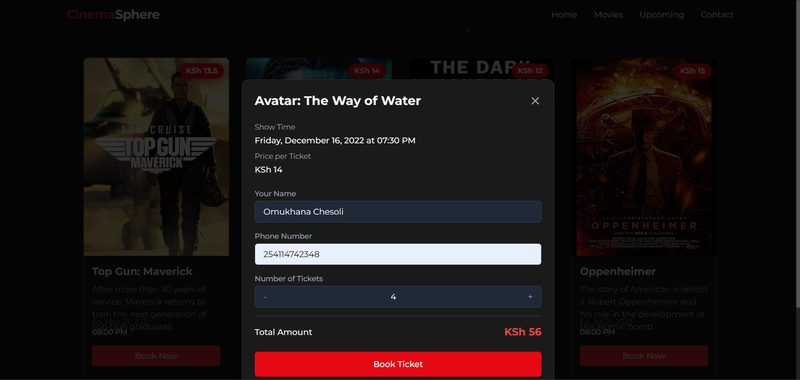
We're creating a movie ticket booking system where users can browse available movies, select how many tickets they want, enter their details, pay via M-Pesa STK Push, and receive confirmation when payment succeeds.
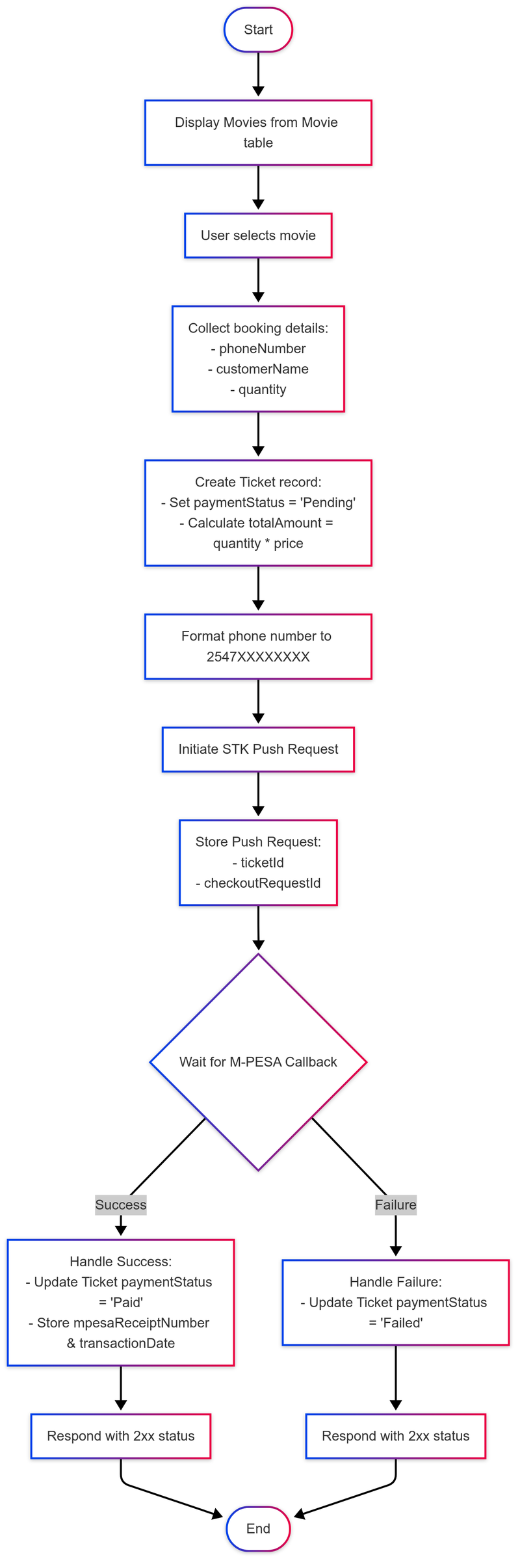
The system handles the complete flow: creating ticket records, initiating STK Push, storing the CheckoutRequestID, waiting for callbacks, and updating the database based on results.
Here's the tech stack:
- Backend: Python 3.8+ with Flask
- Database: SQLite (easily swappable for PostgreSQL/MySQL in production)
- ORM: SQLAlchemy for database operations
- HTTP Requests: The
requestslibrary for communicating with Daraja - Frontend: HTML with Tailwind CSS and vanilla JavaScript
Before we start coding, make sure you have:
- Python 3.8 or higher installed
- A Daraja sandbox account with an app created
- Your Daraja credentials: Consumer Key, Consumer Secret, Passkey, and Shortcode
- Ngrok installed for testing callbacks locally
- Basic familiarity with Flask and Python
You should have read the conceptual guide. We won't re-explain why we need a CheckoutRequestID or why payment status starts as pending—we covered that already. This guide focuses on how to implement what you've learned.
Create a new directory for your project and navigate into it:
mkdir mpesa_movie_system
cd mpesa_movie_system
Set up a virtual environment to keep dependencies isolated:
python -m venv venvActivate it:
On Linux/Mac
source venv/bin/activateOn Windows
venv\Scripts\activateYou'll see (venv) in your terminal prompt.
Create a requirements.txt file:
Flask==3.1.1
Flask-SQLAlchemy==3.1.1
requests==2.32.3
python-dotenv==1.0.0
Install the dependencies:
pip install -r requirements.txtCreate the project structure:
mkdir templates static static/img instanceYour structure should look like this:
mpesa_movie_system/
│
├── venv/                    # Virtual environment
├── instance/                # Database files (auto-created)
├── templates/               # HTML templates
│   └── index.html
├── static/                  # CSS, JavaScript, images
│   └── img/
├── .env                     # Environment variables
├── .gitignore              # Git ignore file
├── requirements.txt        # Dependencies
├── app.py                  # Main application
└── populate_data.py        # Script to add sample movies
Create a .env file for your credentials:
# M-Pesa Daraja Credentials
MPESA_CONSUMER_KEY=your_consumer_key_here
MPESA_CONSUMER_SECRET=your_consumer_secret_here
MPESA_PASSKEY=your_passkey_here
MPESA_BUSINESS_SHORT_CODE=174379
MPESA_TILL_NUMBER=174379
MPESA_CALLBACK_URL=https://your-ngrok-url/api/mpesa-callback

# Flask Configuration
FLASK_SECRET_KEY=your_secret_key_here
FLASK_ENV=development
Replace the placeholders with your actual Daraja credentials. Leave the callback URL for now—we'll update it when we start Ngrok.
Create a .gitignore file:
venv/
instance/
.env
__pycache__/
*.pyc
*.db
.DS_Store
Never commit your .env file to version control.
Create app.py and start with imports and configuration:
import os
import base64
import requests
from datetime import datetime
from flask import Flask, render_template, request, jsonify
from flask_sqlalchemy import SQLAlchemy
from sqlalchemy.sql import func
from dotenv import load_dotenv

# Load environment variables
load_dotenv()

# Initialize Flask app
app = Flask(__name__)

# Configuration
app.config['SQLALCHEMY_DATABASE_URI'] = 'sqlite:///movie_tickets.db'
app.config['SQLALCHEMY_TRACK_MODIFICATIONS'] = False
app.config['SECRET_KEY'] = os.getenv('FLASK_SECRET_KEY')

# M-Pesa Configuration
app.config['MPESA_BASE_URL'] = 'https://sandbox.safaricom.co.ke'
app.config['MPESA_ACCESS_TOKEN_URL'] = 'oauth/v1/generate?grant_type=client_credentials'
app.config['MPESA_STK_PUSH_URL'] = 'mpesa/stkpush/v1/processrequest'
app.config['MPESA_STK_QUERY_URL'] = 'mpesa/stkpushquery/v1/query'
app.config['MPESA_BUSINESS_SHORT_CODE'] = os.getenv('MPESA_BUSINESS_SHORT_CODE')
app.config['MPESA_PASSKEY'] = os.getenv('MPESA_PASSKEY')
app.config['MPESA_TILL_NUMBER'] = os.getenv('MPESA_TILL_NUMBER')
app.config['MPESA_CALLBACK_URL'] = os.getenv('MPESA_CALLBACK_URL')
app.config['MPESA_CONSUMER_KEY'] = os.getenv('MPESA_CONSUMER_KEY')
app.config['MPESA_CONSUMER_SECRET'] = os.getenv('MPESA_CONSUMER_SECRET')

# Initialize SQLAlchemy
db = SQLAlchemy(app)
The load_dotenv() reads your .env file. The Flask config stores both Flask settings and M-Pesa credentials. Notice the base URL is for sandbox—when you move to production, change this to https://api.safaricom.co.ke.
Now define the database models:
# Database Models

class Movie(db.Model):
    """
    Movie model representing movies available for booking
    """
    __tablename__ = 'movie'

    movieId = db.Column(db.Integer, primary_key=True)
    title = db.Column(db.String(255), nullable=False)
    description = db.Column(db.Text)
    showTime = db.Column(db.DateTime, nullable=False)
    price = db.Column(db.Numeric(10, 2), nullable=False)
    maximumTickets = db.Column(db.Integer, nullable=False, default=100)
    imageUrl = db.Column(db.String(255))
    dateCreated = db.Column(db.DateTime, default=func.now())
    lastUpdated = db.Column(db.DateTime, default=func.now(), onupdate=func.now())

    # Relationship with Ticket model
    tickets = db.relationship('Ticket', back_populates='movie', cascade='all, delete-orphan')

    def to_dict(self):
        """Convert movie object to dictionary for JSON responses"""
        return {
            'movieId': self.movieId,
            'title': self.title,
            'description': self.description,
            'showTime': self.showTime.isoformat() if self.showTime else None,
            'price': float(self.price),
            'maximumTickets': self.maximumTickets,
            'imageUrl': self.imageUrl,
            'dateCreated': self.dateCreated.isoformat() if self.dateCreated else None,
            'lastUpdated': self.lastUpdated.isoformat() if self.lastUpdated else None,
        }


class Ticket(db.Model):
    """
    Ticket model representing purchased tickets
    """
    __tablename__ = 'ticket'

    ticketId = db.Column(db.Integer, primary_key=True)
    movieId = db.Column(db.Integer, db.ForeignKey('movie.movieId', ondelete='CASCADE'), nullable=False)
    customerName = db.Column(db.String(255), nullable=False)
    phoneNumber = db.Column(db.String(20), nullable=False)
    quantity = db.Column(db.Integer, nullable=False)
    totalAmount = db.Column(db.Numeric(10, 2), nullable=False)
    paymentStatus = db.Column(db.Enum('Pending', 'Paid', 'Failed'), default='Pending', nullable=False)
    mpesaReceiptNumber = db.Column(db.String(100))
    transactionDate = db.Column(db.DateTime)
    dateCreated = db.Column(db.DateTime, default=func.now())
    lastUpdated = db.Column(db.DateTime, default=func.now(), onupdate=func.now())

    # Relationship with Movie model
    movie = db.relationship('Movie', back_populates='tickets')

    # Relationship with PushRequest model
    push_requests = db.relationship('PushRequest', back_populates='ticket', cascade='all, delete-orphan')

    def to_dict(self):
        """Convert ticket object to dictionary"""
        return {
            'ticketId': self.ticketId,
            'movieId': self.movieId,
            'customerName': self.customerName,
            'phoneNumber': self.phoneNumber,
            'quantity': self.quantity,
            'totalAmount': float(self.totalAmount),
            'paymentStatus': self.paymentStatus,
            'mpesaReceiptNumber': self.mpesaReceiptNumber,
            'transactionDate': self.transactionDate.isoformat() if self.transactionDate else None,
            'dateCreated': self.dateCreated.isoformat() if self.dateCreated else None,
            'lastUpdated': self.lastUpdated.isoformat() if self.lastUpdated else None,
        }


class PushRequest(db.Model):
    """
    PushRequest model for tracking M-Pesa STK push requests
    """
    __tablename__ = 'pushrequest'

    pushRequestId = db.Column(db.Integer, primary_key=True)
    ticketId = db.Column(db.Integer, db.ForeignKey('ticket.ticketId', ondelete='CASCADE'), nullable=False)
    checkoutRequestId = db.Column(db.String(255), nullable=False)
    dateCreated = db.Column(db.DateTime, default=func.now())
    lastUpdated = db.Column(db.DateTime, default=func.now(), onupdate=func.now())

    # Relationship with Ticket model
    ticket = db.relationship('Ticket', back_populates='push_requests')

    def to_dict(self):
        """Convert push request object to dictionary"""
        return {
            'pushRequestId': self.pushRequestId,
            'ticketId': self.ticketId,
            'checkoutRequestId': self.checkoutRequestId,
            'dateCreated': self.dateCreated.isoformat() if self.dateCreated else None,
            'lastUpdated': self.lastUpdated.isoformat() if self.lastUpdated else None,
        }
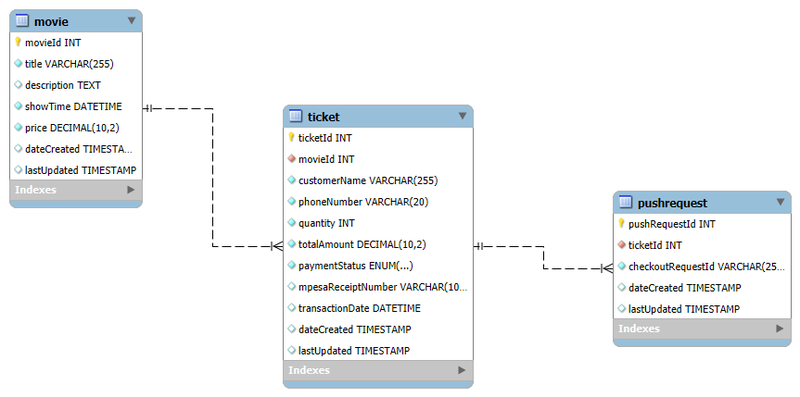
The Movie model stores movie information. The tickets relationship tells SQLAlchemy that one movie can have many tickets. The cascade='all, delete-orphan' means if you delete a movie, all its tickets are automatically deleted.
The Ticket model tracks purchases. The paymentStatus uses an Enum to restrict values to 'Pending', 'Paid', or 'Failed'. Notice mpesaReceiptNumber and transactionDate don't have nullable=False—they can be NULL initially because we don't have these values when first creating a ticket.
The PushRequest model links CheckoutRequestIDs back to tickets. When the callback arrives with a CheckoutRequestID, we query this table to find which ticket it belongs to.
The to_dict() methods convert model objects to dictionaries so we can return them as JSON. We use .isoformat() for datetime fields to convert them to strings.
Add these helper functions after the model definitions:
# Helper Functions for M-Pesa Integration

def get_access_token():
    """
    Gets an access token from the Safaricom M-Pesa API

    Returns:
        str: Access token if successful, None otherwise
    """
    url = os.path.join(
        app.config['MPESA_BASE_URL'],
        app.config['MPESA_ACCESS_TOKEN_URL']
    )

    headers = {'Content-Type': 'application/json'}

    auth = (
        app.config['MPESA_CONSUMER_KEY'],
        app.config['MPESA_CONSUMER_SECRET']
    )

    try:
        response = requests.get(url, headers=headers, auth=auth)
        response.raise_for_status()
        result = response.json()
        return result.get('access_token')

    except requests.exceptions.RequestException as e:
        print(f"Error getting access token: {str(e)}")
        return None


def format_phone_number(phone_number):
    """
    Formats a phone number to the required format for M-Pesa API (254XXXXXXXXX)

    Args:
        phone_number (str): Phone number to format

    Returns:
        str: Formatted phone number
    """
    # Remove any non-digit characters
    phone_number = ''.join(filter(str.isdigit, phone_number))

    # Check if the number starts with '0' and replace with '254'
    if phone_number.startswith('0'):
        phone_number = '254' + phone_number[1:]

    # Check if the number starts with '+254' and remove the '+'
    elif phone_number.startswith('254'):
        # Already in correct format
        pass

    # If number doesn't have country code, add it
    elif not phone_number.startswith('254'):
        phone_number = '254' + phone_number

    return phone_number
The get_access_token() function makes a GET request to Safaricom's OAuth endpoint with Basic Authentication. The auth parameter takes a tuple of (Consumer Key, Consumer Secret). The requests library automatically handles the Basic Auth encoding. We wrap it in try-except—if anything goes wrong, we log the error and return None.
The format_phone_number() function implements the formatting rules: remove non-digits, then handle different formats to convert everything to 254XXXXXXXXX.
Now let's build the API routes. Start with the homepage:
# Routes

@app.route('/')
def index():
    """Root endpoint - serves the main page"""
    return render_template('index.html')


@app.route('/api/movies', methods=['GET'])
def get_movies():
    """
    Endpoint to get all movies

    Returns:
        JSON: List of movies
    """
    movies = Movie.query.all()
    return jsonify({'movies': [movie.to_dict() for movie in movies]})


@app.route('/api/movies/<int:movie_id>', methods=['GET'])
def get_movie(movie_id):
    """
    Endpoint to get a specific movie by ID

    Args:
        movie_id (int): Movie ID

    Returns:
        JSON: Movie details or error
    """
    movie = Movie.query.get(movie_id)
    if not movie:
        return jsonify({'error': 'Movie not found'}), 404

    return jsonify({'movie': movie.to_dict()})
These are straightforward. The homepage serves our HTML template. The movies endpoints query the database and return JSON.
Now the payment endpoint—this is where it gets interesting:
@app.route('/api/make-payment', methods=['POST'])
def make_payment():
    """
    Endpoint to initiate M-Pesa payment

    Expected JSON payload:
    {
        "movieId": 1,
        "customerName": "John Doe",
        "phoneNumber": "254712345678",
        "quantity": 2
    }

    Returns:
        JSON: Payment initiation results or error
    """
    data = request.get_json()

    try:
        # Validate required fields
        required_fields = ['movieId', 'customerName', 'phoneNumber', 'quantity']
        for field in required_fields:
            if field not in data:
                return jsonify({'error': f'Missing required field: {field}'}), 400

        # Get the movie
        movie = Movie.query.get(data['movieId'])
        if not movie:
            return jsonify({'error': 'Movie not found'}), 404

        quantity = int(data['quantity'])

        # Check if enough tickets are available
        tickets_sold = (
            db.session.query(db.func.sum(Ticket.quantity))
            .filter(Ticket.movieId == movie.movieId, Ticket.paymentStatus == 'Paid')
            .scalar() or 0
        )

        if tickets_sold + quantity > movie.maximumTickets:
            return jsonify({
                'error': f'Not enough tickets available. Only {movie.maximumTickets - tickets_sold} left.'
            }), 400

        # Calculate total amount
        total_amount = float(movie.price) * quantity

        # Format phone number
        formatted_phone = format_phone_number(data['phoneNumber'])

        # Create a new ticket record with pending status
        new_ticket = Ticket(
            movieId=movie.movieId,
            customerName=data['customerName'],
            phoneNumber=formatted_phone,
            quantity=quantity,
            totalAmount=total_amount,
            paymentStatus='Pending'
        )

        db.session.add(new_ticket)
        db.session.flush()  # Get the ID without committing

        # Get access token for M-Pesa API
        access_token = get_access_token()
        if not access_token:
            db.session.rollback()
            return jsonify({'error': 'Failed to get M-Pesa access token'}), 500

        # Prepare STK push request
        timestamp = datetime.now().strftime('%Y%m%d%H%M%S')
        password = base64.b64encode(
            (
                app.config['MPESA_BUSINESS_SHORT_CODE']
                + app.config['MPESA_PASSKEY']
                + timestamp
            ).encode()
        ).decode()

        stk_push_url = os.path.join(
            app.config['MPESA_BASE_URL'],
            app.config['MPESA_STK_PUSH_URL']
        )

        stk_push_headers = {
            'Content-Type': 'application/json',
            'Authorization': 'Bearer ' + access_token
        }

        stk_push_payload = {
            'BusinessShortCode': app.config['MPESA_BUSINESS_SHORT_CODE'],
            'Password': password,
            'Timestamp': timestamp,
            'TransactionType': 'CustomerBuyGoodsOnline',
            'Amount': int(total_amount),
            'PartyA': formatted_phone,
            'PartyB': app.config['MPESA_TILL_NUMBER'],
            'PhoneNumber': formatted_phone,
            'CallBackURL': app.config['MPESA_CALLBACK_URL'],
            'AccountReference': 'Movie Ticket',
            'TransactionDesc': 'Movie Tckt'
        }

        # Send STK push request
        response = requests.post(
            stk_push_url,
            headers=stk_push_headers,
            json=stk_push_payload
        )

        mpesa_response = response.json()

        # Check if STK push was successful
        if 'ResponseCode' in mpesa_response and mpesa_response['ResponseCode'] == '0':
            # Create PushRequest record
            checkout_request_id = mpesa_response.get('CheckoutRequestID')
            push_request = PushRequest(
                ticketId=new_ticket.ticketId,
                checkoutRequestId=checkout_request_id
            )

            db.session.add(push_request)
            db.session.commit()

            return jsonify({
                'message': 'Payment initiated successfully',
                'ticketId': new_ticket.ticketId,
                'checkoutRequestId': checkout_request_id,
                'responseDescription': mpesa_response.get('ResponseDescription', '')
            })

        else:
            db.session.rollback()
            return jsonify({
                'error': 'Failed to initiate payment',
                'mpesaResponse': mpesa_response
            }), 500

    except Exception as e:
        db.session.rollback()
        return jsonify({'error': str(e)}), 500
Let's walk through what happens here:
Step 1: Validate Input - We check that all required fields are present. If any are missing, return 400 Bad Request.
Step 2: Check Movie and Availability - We fetch the movie. If it doesn't exist, return 404. Then we calculate how many tickets have been sold (only counting 'Paid' tickets). If this order would exceed the maximum, we reject it.
Step 3: Create Ticket Record - We calculate the total, format the phone number, then create the ticket with status 'Pending'. The flush() saves it to the database and assigns an ID, but doesn't commit the transaction yet. This lets us get the ticketId while still being able to rollback if the STK Push fails.
Step 4: Get Access Token - We call our helper function. If it fails, we rollback the transaction (removing the ticket) and return an error.
Step 5: Generate Password - We get the current timestamp in YYYYMMDDHHmmss format, then create the password by concatenating shortcode + passkey + timestamp and Base64 encoding it.
Step 6: Send STK Push - We build the complete payload with all required parameters and send the POST request to Safaricom.
Step 7: Handle Response - If Safaricom returns ResponseCode '0', the STK Push was successful. We extract the CheckoutRequestID, create the PushRequest record linking it to our ticket, commit everything, and return success. If anything went wrong, we rollback and return an error.
Add the STK Query endpoint:
@app.route('/api/query-payment-status', methods=['POST'])
def perform_stk_query():
    """
    Endpoint to query the status of an STK push transaction

    Expected JSON payload:
    {
        "checkoutRequestId": "ws_CO_DMZ_12345678901234567"
    }

    Returns:
        JSON: STK query result or error
    """
    data = request.get_json()
    checkout_request_id = data.get('checkoutRequestId')

    if not checkout_request_id:
        return jsonify({'error': 'Checkout Request ID not provided'}), 400

    try:
        # Get access token
        access_token = get_access_token()
        if not access_token:
            return jsonify({'error': 'Failed to get M-Pesa access token'}), 500

        # Prepare STK query request
        timestamp = datetime.now().strftime('%Y%m%d%H%M%S')
        password = base64.b64encode(
            (
                app.config['MPESA_BUSINESS_SHORT_CODE']
                + app.config['MPESA_PASSKEY']
                + timestamp
            ).encode()
        ).decode()

        query_url = os.path.join(
            app.config['MPESA_BASE_URL'],
            app.config['MPESA_STK_QUERY_URL']
        )

        query_headers = {
            'Content-Type': 'application/json',
            'Authorization': 'Bearer ' + access_token
        }

        query_payload = {
            'BusinessShortCode': app.config['MPESA_BUSINESS_SHORT_CODE'],
            'Password': password,
            'Timestamp': timestamp,
            'CheckoutRequestID': checkout_request_id
        }

        # Send STK query request
        response = requests.post(query_url, headers=query_headers, json=query_payload)
        return jsonify(response.json())

    except Exception as e:
        return jsonify({'error': str(e)}), 500
The STK Query follows the same pattern: get access token, generate password, build payload (only needs 4 parameters: shortcode, password, timestamp, and CheckoutRequestID), send request, return response. Remember—this is optional and only for UX. Never use it to update your database.
Now the callback endpoint—where Safaricom sends transaction results:
@app.route('/api/mpesa-callback', methods=['POST'])
def callback_function():
    """
    Callback endpoint for M-Pesa payment notifications

    Expected payload from M-Pesa API after payment

    Returns:
        JSON: Acknowledgement message
    """
    try:
        response = request.get_json()
        print("Received callback from Safaricom:")
        print(response)

        callback_data = response.get('Body', {}).get('stkCallback', {})

        # Check if callback data exists
        if not callback_data:
            return jsonify({'error': 'Invalid callback data'}), 400

        # Get result code and checkout request ID
        result_code = callback_data.get('ResultCode')
        checkout_request_id = callback_data.get('CheckoutRequestID')

        # Find the associated push request
        push_request = PushRequest.query.filter_by(
            checkoutRequestId=checkout_request_id
        ).first()

        if not push_request:
            return jsonify({'error': 'No matching push request found'}), 404

        # Get the associated ticket
        ticket = Ticket.query.get(push_request.ticketId)

        if not ticket:
            return jsonify({'error': 'No matching ticket found'}), 404

        # Process successful payment
        if result_code == 0:
            # Extract payment details
            callback_metadata = callback_data.get('CallbackMetadata', {}).get('Item', [])

            # Extract receipt number and transaction date
            receipt_number = next(
                (item.get('Value') for item in callback_metadata
                 if item.get('Name') == 'MpesaReceiptNumber'),
                None
            )

            transaction_date_str = next(
                (item.get('Value') for item in callback_metadata
                 if item.get('Name') == 'TransactionDate'),
                None
            )

            # Convert transaction date string to datetime
            transaction_date = None
            if transaction_date_str:
                try:
                    transaction_date = datetime.strptime(
                        str(transaction_date_str), '%Y%m%d%H%M%S'
                    )
                except ValueError:
                    transaction_date = datetime.now()

            # Update ticket with payment details
            ticket.paymentStatus = 'Paid'
            ticket.mpesaReceiptNumber = receipt_number
            ticket.transactionDate = transaction_date

            db.session.commit()

            return jsonify({'message': 'Payment completed successfully'})

        # Process failed payment
        else:
            # Update ticket status to Failed
            ticket.paymentStatus = 'Failed'
            db.session.commit()

            return jsonify({
                'message': 'Payment failed',
                'result_code': result_code
            })

    except Exception as e:
        db.session.rollback()
        return jsonify({'error': str(e)}), 500
The callback logic:
Step 1: Extract Data - Safaricom sends nested JSON. We navigate to the stkCallback object which contains the actual transaction data.
Step 2: Find the Ticket - We extract the ResultCode (0 = success, anything else = failure) and CheckoutRequestID. We query the pushrequest table to find which ticket this callback is about.
Step 3: Handle Success - For successful payments (ResultCode == 0), Safaricom includes CallbackMetadata with the receipt number, transaction date, amount, and phone number. We use generator expressions with next() to extract the fields we need. The metadata is an array of objects like:
[
    {'Name': 'Amount', 'Value': 50},
    {'Name': 'MpesaReceiptNumber', 'Value': 'TEE2QR5JMI'},
    {'Name': 'TransactionDate', 'Value': 20250514201201}
]
We search for items where Name == 'MpesaReceiptNumber' and extract the Value.
Step 4: Parse and Update - We parse the transaction date from Safaricom's format (YYYYMMDDHHmmss) into a Python datetime. Then we update the ticket: change status to 'Paid', store the receipt number, store the transaction date, and commit.
Step 5: Handle Failure - For failed payments, we simply update the status to 'Failed'. We leave the receipt number and transaction date as NULL.
Step 6: Acknowledge - Both branches return a 200 status code. This tells Safaricom "I received your callback," not "the payment was successful." Even for failed payments, we acknowledge receipt.
Add the ticket details endpoint:
@app.route('/api/tickets/<int:ticket_id>', methods=['GET'])
def get_ticket(ticket_id):
    """
    Endpoint to get details of a specific ticket

    Args:
        ticket_id (int): Ticket ID

    Returns:
        JSON: Ticket details including movie information
    """
    ticket = Ticket.query.get(ticket_id)

    if not ticket:
        return jsonify({'error': 'Ticket not found'}), 404

    # Get the associated movie
    movie = Movie.query.get(ticket.movieId)

    if not movie:
        return jsonify({'error': 'Associated movie not found'}), 404

    # Combine ticket and movie information
    ticket_data = ticket.to_dict()
    ticket_data['movie'] = movie.to_dict()

    return jsonify({'ticket': ticket_data})
This fetches a specific ticket and includes the full movie details. The frontend calls this after successful payment to show confirmation.
Finally, add the application entry point:
if __name__ == '__main__':
    # Create the database if it doesn't exist
    with app.app_context():
        db.create_all()

    # Run the Flask app
    app.run(debug=True, host='0.0.0.0', port=5000)
The db.create_all() creates all tables defined in our models if they don't exist. The debug=True enables Flask's debug mode with helpful error messages and auto-reload. The host='0.0.0.0' makes the server accessible from other machines (important for Ngrok). The port=5000 specifies which port to run on.
Before testing, we need movies in the database. Create populate_data.py:
from app import app, db, Movie
from datetime import datetime


def populate_movies():
    """Populate the database with sample movies"""

    with app.app_context():
        # Check if movies already exist
        if Movie.query.count() > 0:
            print("Movies already exist in database")
            return

        movies = [
            Movie(
                title='Top Gun: Maverick',
                description='After more than 30 years of service, Maverick returns to train the next generation of Top Gun graduates.',
                showTime=datetime(2025, 6, 15, 20, 0, 0),
                price=13.50,
                maximumTickets=200,
                imageUrl='https://encrypted-tbn2.gstatic.com/images?q=tbn:ANd9GcSEWEKrGjS-mQ_YGDUvlPjZQoLhZ084Cf-o2nBU7BkvZVUjJf8poO5BL0510QhJhhUxF9qK'
            ),
            Movie(
                title='Avatar: The Way of Water',
                description='Jake Sully lives with his new family formed on the extrasolar moon Pandora.',
                showTime=datetime(2025, 6, 20, 19, 30, 0),
                price=14.00,
                maximumTickets=220,
                imageUrl='https://encrypted-tbn2.gstatic.com/images?q=tbn:ANd9GcSxTA7S2fDMhUDVcZnuxuie2xE_ayntCdkCKme3EK3ObKXFuhdaLhYYTpzUHZ45-IQzQt6T'
            ),
            Movie(
                title='The Batman',
                description='Batman ventures into Gotham City\'s underworld when a sadistic killer leaves behind a trail of cryptic clues.',
                showTime=datetime(2025, 6, 18, 21, 0, 0),
                price=12.00,
                maximumTickets=180,
                imageUrl='https://encrypted-tbn0.gstatic.com/images?q=tbn:ANd9GcQpBA5a1V4L0WZ7vOB8DLuZmWwdouli_6N1BUE9Lj46_Sx2Pzd5Hy9P7GNbXBL0a_fPcTrD'
            ),
            Movie(
                title='Oppenheimer',
                description='The story of American scientist J. Robert Oppenheimer and his role in the development of the atomic bomb.',
                showTime=datetime(2025, 6, 25, 20, 0, 0),
                price=15.00,
                maximumTickets=250,
                imageUrl='https://www.thestatesman.com/wp-content/uploads/2023/07/IMG_4356.jpeg'
            ),
            Movie(
                title='Barbie',
                description='Barbie suffers a crisis that leads her to question her world and her existence.',
                showTime=datetime(2025, 6, 22, 18, 45, 0),
                price=13.00,
                maximumTickets=240,
                imageUrl='https://encrypted-tbn2.gstatic.com/images?q=tbn:ANd9GcROuK_Bl8jrLUP7fo3hsDC4XC2AC1WR1CAXS3G1SVqDPZE0pgFTQKnr8P2_cKmRuXg03nPE'
            ),
            Movie(
                title='John Wick: Chapter 4',
                description='John Wick uncovers a path to defeating the High Table.',
                showTime=datetime(2025, 6, 28, 20, 30, 0),
                price=14.00,
                maximumTickets=200,
                imageUrl='https://encrypted-tbn1.gstatic.com/images?q=tbn:ANd9GcTBnfgdj6S32yB-VjpwLVnIE4-CHop12_I0ZqWJOEDnMMfhCMPhuQqyMZKwwvP2-wgOhV0bRA'
            ),
            Movie(
                title='Guardians of the Galaxy Vol. 3',
                description='The Guardians must band together to protect one of their own.',
                showTime=datetime(2025, 7, 2, 20, 15, 0),
                price=14.50,
                maximumTickets=210,
                imageUrl='https://encrypted-tbn1.gstatic.com/images?q=tbn:ANd9GcRkyKX8165zgrg_ded57Dq66MKQsx7K8VNHyCB4u7Kbm5qJgv5Sh6WO-oPi2oCnsVbsRicmg'
            ),
            Movie(
                title='Mission: Impossible – Dead Reckoning Part One',
                description='Ethan Hunt and his team must track down a terrifying new weapon.',
                showTime=datetime(2025, 7, 5, 19, 45, 0),
                price=15.00,
                maximumTickets=230,
                imageUrl='https://encrypted-tbn3.gstatic.com/images?q=tbn:ANd9GcR34_otMSvSpe1Nn8Iip4kpkcaAHrUGaIITwQYC9iRIL4q34rHhTY2cTYrbRe303iD5fdsm'
            ),
            Movie(
                title='Dune: Part Two',
                description='Paul Atreides unites with the Fremen to seek revenge against the conspirators who destroyed his family.',
                showTime=datetime(2025, 7, 8, 20, 0, 0),
                price=16.00,
                maximumTickets=250,
                imageUrl='https://encrypted-tbn3.gstatic.com/images?q=tbn:ANd9GcR1HYYqIoovqLVr7DQU9tevo_bMrzQqJ7LQiVnjyK1x5BUHqrjFB_JDtftcR1Sxo1cPE0fPmg'
            ),
            Movie(
                title='Inside Out 2',
                description='Follow Riley as she navigates the emotional rollercoaster of her teenage years.',
                showTime=datetime(2025, 7, 10, 18, 30, 0),
                price=12.75,
                maximumTickets=220,
                imageUrl='https://encrypted-tbn3.gstatic.com/images?q=tbn:ANd9GcRqxN_rXyicI6JFjnOm1lVeoYG0w99CF5uW0NHjpvMaDgil6kVQxZ76qTQXu0V10D_WwBhGPg'
            ),
            Movie(
                title='The Marvels',
                description='Carol Danvers, Kamala Khan, and Monica Rambeau team up to unravel a universe-threatening mystery.',
                showTime=datetime(2025, 7, 12, 20, 0, 0),
                price=13.50,
                maximumTickets=210,
                imageUrl='https://encrypted-tbn0.gstatic.com/images?q=tbn:ANd9GcRr2CHFXhorQkI9wP5KMf290fdqX7eRnl95P_BddZBIEuCqOAI7FYUnILfgo_ovnCK4ppeQyA'
            ),
            Movie(
                title='Deadpool 3',
                description='Deadpool joins the MCU and causes chaos with Wolverine.',
                showTime=datetime(2025, 7, 15, 21, 0, 0),
                price=17.00,
                maximumTickets=260,
                imageUrl='https://encrypted-tbn1.gstatic.com/images?q=tbn:ANd9GcTFs2b42I8mdYGULACpk8zRlBMHFP_ligKNHTuYvnswpNg4rDm87RY2K74SJ-kh6Wtj9mbZiw'
            ),
        ]

        for movie in movies:
            db.session.add(movie)

        db.session.commit()
        print(f"Successfully added {len(movies)} movies to the database!")
        print("\nMovies added:")
        for movie in movies:
            print(f"  - {movie.title} (KSh {movie.price})")


if __name__ == '__main__':
    populate_movies()
Run this script to populate your database with 12 sample movies:
python populate_data.pyWe've built a complete backend that handles M-Pesa payments. Now we need a frontend that users can actually interact with. We're not building a generic "contact form with a payment button"—we're building a real movie booking interface that feels like production software.
The frontend needs to:
- Fetch and display movies dynamically
- Open a booking modal when someone clicks "Book Now"
- Validate user input before sending it to the backend
- Show real-time payment status updates
- Handle errors gracefully with toast notifications
- Poll the STK Query endpoint while waiting for payment
Let's build it.
Create templates/index.html with this complete implementation:
<!DOCTYPE html>
<html lang="en">
<head>
<meta charset="UTF-8">
<meta name="viewport" content="width=device-width, initial-scale=1.0">
<meta name="description" content="Book movie tickets online with M-Pesa payment integration. Secure, fast, and convenient ticket booking for the latest movies.">
<meta name="keywords" content="movie tickets, M-Pesa payment, online booking, cinema tickets, STK push">
<meta name="author" content="CinemaSphere">
<meta property="og:title" content="CinemaSphere - Book Your Movie Experience">
<meta property="og:description" content="Book movie tickets online with instant M-Pesa payment. Browse latest movies and secure your seats in seconds.">
<meta property="og:type" content="website">
<meta property="og:image" content="/static/img/cinema_interior.avif">
<title>CinemaSphere - Book Your Movie Experience | M-Pesa Integration</title>
<!-- Tailwind CSS -->
<link href="https://cdnjs.cloudflare.com/ajax/libs/tailwindcss/2.2.19/tailwind.min.css" rel="stylesheet">
<style>
@import url('https://fonts.googleapis.com/css2?family=Montserrat:wght@300;400;500;600;700&display=swap');
:root {
--primary: #E50914;
--primary-dark: #B81D24;
--secondary: #221F1F;
--light: #F5F5F1;
--gray: #EFEFEF;
--dark: #121212;
}
* {
margin: 0;
padding: 0;
box-sizing: border-box;
font-family: 'Montserrat', sans-serif;
}
body {
background-color: var(--dark);
color: var(--light);
}
.hero {
background: linear-gradient(rgba(0, 0, 0, 0.7), rgba(0, 0, 0, 0.9)),
url('/static/img/cinema_interior.avif') center/cover no-repeat;
height: 60vh;
position: relative;
}
.navbar {
background-color: rgba(18, 18, 18, 0.9);
backdrop-filter: blur(5px);
}
.btn-primary {
background-color: var(--primary);
color: white;
transition: all 0.3s ease;
}
.btn-primary:hover {
background-color: var(--primary-dark);
transform: translateY(-2px);
}
.movie-card {
transition: all 0.3s ease;
border-radius: 8px;
overflow: hidden;
background-color: #1a1a1a;
border: 1px solid #333;
}
.movie-card:hover {
transform: translateY(-10px);
box-shadow: 0 10px 25px rgba(229, 9, 20, 0.2);
}
.movie-poster {
height: 380px;
width: 100%;
object-fit: cover;
border-radius: 8px 8px 0 0;
}
.modal {
display: none;
position: fixed;
z-index: 50;
left: 0;
top: 0;
width: 100%;
height: 100%;
overflow: auto;
background-color: rgba(0, 0, 0, 0.8);
opacity: 0;
transition: opacity 0.3s ease;
}
.modal.show {
display: block;
opacity: 1;
}
.modal-content {
background-color: #1a1a1a;
border-radius: 12px;
border: 1px solid #333;
width: 90%;
max-width: 600px;
margin: 10% auto;
transform: translateY(-50px);
transition: transform 0.4s ease;
box-shadow: 0 5px 30px rgba(0, 0, 0, 0.5);
}
.modal.show .modal-content {
transform: translateY(0);
}
.toast-container {
position: fixed;
bottom: 20px;
right: 20px;
z-index: 1000;
}
.toast {
transition: all 0.3s ease;
}
.loading-dots span {
animation: loading 1.4s infinite ease-in-out both;
}
.loading-dots span:nth-child(1) {
animation-delay: -0.32s;
}
.loading-dots span:nth-child(2) {
animation-delay: -0.16s;
}
@keyframes loading {
0%, 80%, 100% { transform: scale(0); }
40% { transform: scale(1.0); }
}
/* Custom scrollbar */
::-webkit-scrollbar {
width: 8px;
}
::-webkit-scrollbar-track {
background: #222;
}
::-webkit-scrollbar-thumb {
background: #555;
border-radius: 4px;
}
::-webkit-scrollbar-thumb:hover {
background: #777;
}
/* Section transitions */
.section {
opacity: 0;
transform: translateY(20px);
transition: opacity 0.8s ease, transform 0.8s ease;
}
.section.visible {
opacity: 1;
transform: translateY(0);
}
/* Price tag styles */
.price-tag {
background-color: var(--primary);
color: white;
font-weight: bold;
border-radius: 20px;
padding: 0.25rem 0.75rem;
position: absolute;
top: 10px;
right: 10px;
font-size: 0.9rem;
box-shadow: 0 2px 10px rgba(0, 0, 0, 0.3);
}
footer {
background-color: rgba(18, 18, 18, 0.95);
border-top: 1px solid #333;
}
</style>
</head>
<body>
<!-- Toast Notifications Container -->
<div id="toast-container" class="toast-container"></div>
<!-- Navigation Bar -->
<nav class="navbar fixed top-0 w-full z-10 py-3 px-4 md:px-6">
<div class="max-w-7xl mx-auto flex justify-between items-center">
<a href="/" class="flex items-center">
<span class="text-2xl font-bold tracking-tight">
<span class="text-red-600">Cinema</span><span class="text-white">Sphere</span>
</span>
</a>
<div class="hidden md:flex space-x-8">
<a href="/" class="text-white hover:text-red-500 transition-colors duration-300">Home</a>
<a href="#movies" class="text-white hover:text-red-500 transition-colors duration-300">Movies</a>
<a href="#about-us" class="text-white hover:text-red-500 transition-colors duration-300">About</a>
<a href="#contact" class="text-white hover:text-red-500 transition-colors duration-300">Contact</a>
</div>
<button id="mobile-menu-button" class="md:hidden text-white">
<svg xmlns="http://www.w3.org/2000/svg" class="h-6 w-6" fill="none" viewBox="0 0 24 24" stroke="currentColor">
<path stroke-linecap="round" stroke-linejoin="round" stroke-width="2" d="M4 6h16M4 12h16M4 18h16" />
</svg>
</button>
</div>
<!-- Mobile Menu -->
<div id="mobile-menu" class="hidden md:hidden absolute top-16 left-0 right-0 bg-gray-900 shadow-lg rounded-b-lg overflow-hidden transition-all duration-300">
<div class="px-4 py-2">
<a href="/" class="block py-3 text-white hover:text-red-500 transition-colors duration-300">Home</a>
<a href="#movies" class="block py-3 text-white hover:text-red-500 transition-colors duration-300">Movies</a>
<a href="#about-us" class="block py-3 text-white hover:text-red-500 transition-colors duration-300">About</a>
<a href="#contact" class="block py-3 text-white hover:text-red-500 transition-colors duration-300">Contact</a>
</div>
</div>
</nav>
<!-- Hero Section -->
<section class="hero flex items-center justify-center px-4">
<div class="text-center max-w-4xl">
<h1 class="text-4xl md:text-6xl font-bold mb-4 leading-tight">
Experience Movies Like <span class="text-red-600">Never Before</span>
</h1>
<p class="text-lg md:text-xl mb-8 max-w-2xl mx-auto">
Book your tickets for the latest blockbusters and immerse yourself in the ultimate cinematic experience.
</p>
<a href="#movies" class="btn-primary px-8 py-3 rounded-full font-medium text-lg inline-block">Book Now</a>
</div>
</section>
<!-- Featured Movies Section -->
<section id="movies" class="py-16 px-4 md:px-8 max-w-7xl mx-auto section">
<div class="mb-12 text-center">
<h2 class="text-3xl md:text-4xl font-bold mb-4">Now Showing</h2>
<p class="text-gray-400 max-w-2xl mx-auto">
Select a movie to book your tickets and enjoy the ultimate cinema experience with the best sound and picture quality.
</p>
</div>
<div id="movies-container" class="grid grid-cols-1 sm:grid-cols-2 lg:grid-cols-3 xl:grid-cols-4 gap-8">
<!-- Movie cards will be populated dynamically -->
<div class="text-center col-span-full">
<div class="inline-block mx-auto">
<div class="loading-dots flex space-x-2">
<span class="w-3 h-3 bg-red-600 rounded-full"></span>
<span class="w-3 h-3 bg-red-600 rounded-full"></span>
<span class="w-3 h-3 bg-red-600 rounded-full"></span>
</div>
</div>
<p class="mt-4 text-gray-400">Loading movies...</p>
</div>
</div>
</section>
<!-- Booking Modal -->
<div id="booking-modal" class="modal">
<div class="modal-content p-6">
<div class="flex justify-between items-center mb-6">
<h3 class="text-2xl font-bold" id="modal-movie-title">Movie Title</h3>
<button id="close-modal" class="text-gray-400 hover:text-white">
<svg xmlns="http://www.w3.org/2000/svg" class="h-6 w-6" fill="none" viewBox="0 0 24 24" stroke="currentColor">
<path stroke-linecap="round" stroke-linejoin="round" stroke-width="2" d="M6 18L18 6M6 6l12 12" />
</svg>
</button>
</div>
<div class="mb-6">
<div class="mb-2">
<p class="text-sm text-gray-400 mb-1">Show Time</p>
<p id="modal-show-time" class="font-medium">June 1, 2025 - 6:00 PM</p>
</div>
<div class="mb-2">
<p class="text-sm text-gray-400 mb-1">Price per Ticket</p>
<p id="modal-price" class="font-medium">KSh 500</p>
</div>
</div>
<form id="booking-form" class="space-y-4">
<input type="hidden" id="movie-id" name="movieId">
<div>
<label for="customer-name" class="block text-sm font-medium text-gray-400 mb-1">Your Name</label>
<input type="text" id="customer-name" name="customerName" class="w-full px-4 py-2 rounded-md bg-gray-800 border border-gray-700 text-white focus:outline-none focus:ring-2 focus:ring-red-500" required>
</div>
<div>
<label for="phone-number" class="block text-sm font-medium text-gray-400 mb-1">Phone Number</label>
<input type="tel" id="phone-number" name="phoneNumber" placeholder="e.g. 0712345678" class="w-full px-4 py-2 rounded-md bg-gray-800 border border-gray-700 text-white focus:outline-none focus:ring-2 focus:ring-red-500" required>
</div>
<div>
<label for="quantity" class="block text-sm font-medium text-gray-400 mb-1">Number of Tickets</label>
<div class="flex items-center border border-gray-700 rounded-md bg-gray-800">
<button type="button" id="decrease-quantity" class="px-4 py-2 text-gray-400 hover:text-white focus:outline-none">-</button>
<input type="number" id="quantity" name="quantity" value="1" min="1" class="w-full text-center bg-transparent border-none text-white focus:outline-none" readonly>
<button type="button" id="increase-quantity" class="px-4 py-2 text-gray-400 hover:text-white focus:outline-none">+</button>
</div>
</div>
<div class="border-t border-gray-700 pt-4 mt-6">
<div class="flex justify-between items-center mb-6">
<span class="font-medium">Total Amount</span>
<span id="total-amount" class="text-xl font-bold text-red-500">KSh 500</span>
</div>
<button type="submit" id="submit-booking" class="w-full btn-primary py-3 rounded-md font-medium">
Book Ticket
</button>
<button type="button" id="loading-button" class="hidden w-full bg-gray-700 py-3 rounded-md font-medium text-gray-300 cursor-not-allowed" disabled>
<div class="flex justify-center items-center">
<div class="loading-dots flex space-x-2 items-center">
<span class="w-2 h-2 bg-gray-300 rounded-full"></span>
<span class="w-2 h-2 bg-gray-300 rounded-full"></span>
<span class="w-2 h-2 bg-gray-300 rounded-full"></span>
</div>
<span class="ml-2">Processing Payment...</span>
</div>
</button>
</div>
</form>
</div>
</div>
<!-- About Section -->
<section id="about-us" class="py-16 px-4 md:px-8 bg-gray-900 section">
<div class="max-w-7xl mx-auto">
<div class="flex flex-col md:flex-row items-center">
<div class="md:w-1/2 mb-8 md:mb-0 md:pr-8">
<h2 class="text-3xl md:text-4xl font-bold mb-4">Your Ultimate Cinema Experience</h2>
<p class="text-gray-400 mb-6">
Discover the magic of movies in our state-of-the-art theatres designed for the ultimate viewing experience. From crystal-clear projection to immersive sound, every detail has been perfected.
</p>
<ul class="space-y-3">
<li class="flex items-start">
<svg xmlns="http://www.w3.org/2000/svg" class="h-5 w-5 text-red-500 mt-1 mr-2" viewBox="0 0 20 20" fill="currentColor">
<path fill-rule="evenodd" d="M10 18a8 8 0 100-16 8 8 0 000 16zm3.707-9.293a1 1 0 00-1.414-1.414L9 10.586 7.707 9.293a1 1 0 00-1.414 1.414l2 2a1 1 0 001.414 0l4-4z" clip-rule="evenodd" />
</svg>
<span>4K Ultra HD projection with Dolby Vision</span>
</li>
<li class="flex items-start">
<svg xmlns="http://www.w3.org/2000/svg" class="h-5 w-5 text-red-500 mt-1 mr-2" viewBox="0 0 20 20" fill="currentColor">
<path fill-rule="evenodd" d="M10 18a8 8 0 100-16 8 8 0 000 16zm3.707-9.293a1 1 0 00-1.414-1.414L9 10.586 7.707 9.293a1 1 0 00-1.414 1.414l2 2a1 1 0 001.414 0l4-4z" clip-rule="evenodd" />
</svg>
<span>Premium reclining seats with extra legroom</span>
</li>
<li class="flex items-start">
<svg xmlns="http://www.w3.org/2000/svg" class="h-5 w-5 text-red-500 mt-1 mr-2" viewBox="0 0 20 20" fill="currentColor">
<path fill-rule="evenodd" d="M10 18a8 8 0 100-16 8 8 0 000 16zm3.707-9.293a1 1 0 00-1.414-1.414L9 10.586 7.707 9.293a1 1 0 00-1.414 1.414l2 2a1 1 0 001.414 0l4-4z" clip-rule="evenodd" />
</svg>
<span>Dolby Atmos 3D surround sound</span>
</li>
</ul>
</div>
<div class="md:w-1/2">
<div class="rounded-lg overflow-hidden shadow-xl">
<img src="/static/img/cinema_interior.avif" alt="Cinema Interior" class="w-full">
</div>
</div>
</div>
</div>
</section>
<!-- Footer -->
<footer class="py-12 px-4 md:px-8">
<div class="max-w-7xl mx-auto">
<div class="grid grid-cols-1 md:grid-cols-3 gap-8">
<div>
<h4 class="text-xl font-bold mb-4">CinemaSphere</h4>
<p class="text-gray-400 mb-4">
The ultimate destination for movie lovers with the latest blockbusters and classics in stunning quality.
</p>
<div class="flex space-x-4">
<a href="#" class="text-gray-400 hover:text-white transition-colors">
<svg class="w-6 h-6" fill="currentColor" viewBox="0 0 24 24"><path d="M22.675 0h-21.35c-.732 0-1.325.593-1.325 1.325v21.351c0 .731.593 1.324 1.325 1.324h11.495v-9.294h-3.128v-3.622h3.128v-2.671c0-3.1 1.893-4.788 4.659-4.788 1.325 0 2.463.099 2.795.143v3.24l-1.918.001c-1.504 0-1.795.715-1.795 1.763v2.313h3.587l-.467 3.622h-3.12v9.293h6.116c.73 0 1.323-.593 1.323-1.325v-21.35c0-.732-.593-1.325-1.325-1.325z"/></svg>
</a>
<a href="#" class="text-gray-400 hover:text-white transition-colors">
<svg class="w-6 h-6" fill="currentColor" viewBox="0 0 24 24"><path d="M23.953 4.57a10 10 0 01-2.825.775 4.958 4.958 0 002.163-2.723 10.059 10.059 0 01-3.127 1.184 4.92 4.92 0 00-8.384 4.482C7.69 8.095 4.067 6.13 1.64 3.162a4.822 4.822 0 00-.666 2.475c0 1.71.87 3.213 2.188 4.096a4.904 4.904 0 01-2.228-.616v.06a4.923 4.923 0 003.946 4.827 4.996 4.996 0 01-2.212.085 4.936 4.936 0 004.604 3.417 9.867 9.867 0 01-6.102 2.105c-.39 0-.779-.023-1.17-.067a13.995 13.995 0 007.557 2.209c9.053 0 13.998-7.496 13.998-13.985 0-.21 0-.42-.015-.63A9.935 9.935 0 0024 4.59z"/></svg>
</a>
<a href="#" class="text-gray-400 hover:text-white transition-colors">
<svg class="w-6 h-6" fill="currentColor" viewBox="0 0 24 24"><path d="M12 0C8.74 0 8.333.015 7.053.072 5.775.132 4.905.333 4.14.63c-.789.306-1.459.717-2.126 1.384S.935 3.35.63 4.14C.333 4.905.131 5.775.072 7.053.012 8.333 0 8.74 0 12s.015 3.667.072 4.947c.06 1.277.261 2.148.558 2.913.306.788.717 1.459 1.384 2.126.667.666 1.336 1.079 2.126 1.384.766.296 1.636.499 2.913.558C8.333 23.988 8.74 24 12 24s3.667-.015 4.947-.072c1.277-.06 2.148-.262 2.913-.558.788-.306 1.459-.718 2.126-1.384.666-.667 1.079-1.335 1.384-2.126.296-.765.499-1.636.558-2.913.06-1.28.072-1.687.072-4.947s-.015-3.667-.072-4.947c-.06-1.277-.262-2.149-.558-2.913-.306-.789-.718-1.459-1.384-2.126C21.319 1.347 20.651.935 19.86.63c-.765-.297-1.636-.499-2.913-.558C15.667.012 15.26 0 12 0zm0 2.16c3.203 0 3.585.016 4.85.071 1.17.055 1.805.249 2.227.415.562.217.96.477 1.382.896.419.42.679.819.896 1.381.164.422.36 1.057.413 2.227.057 1.266.07 1.646.07 4.85s-.015 3.585-.074 4.85c-.061 1.17-.256 1.805-.421 2.227-.224.562-.479.96-.899 1.382-.419.419-.824.679-1.38.896-.42.164-1.065.36-2.235.413-1.274.057-1.649.07-4.859.07-3.211 0-3.586-.015-4.859-.074-1.171-.061-1.816-.256-2.236-.421-.569-.224-.96-.479-1.379-.899-.421-.419-.69-.824-.9-1.38-.165-.42-.359-1.065-.42-2.235-.045-1.26-.061-1.649-.061-4.844 0-3.196.016-3.586.061-4.861.061-1.17.255-1.814.42-2.234.21-.57.479-.96.9-1.381.419-.419.81-.689 1.379-.898.42-.166 1.051-.361 2.221-.421 1.275-.045 1.65-.06 4.859-.06l.045.03zm0 3.678c-3.405 0-6.162 2.76-6.162 6.162 0 3.405 2.76 6.162 6.162 6.162 3.405 0 6.162-2.76 6.162-6.162 0-3.405-2.76-6.162-6.162-6.162zM12 16c-2.21 0-4-1.79-4-4s1.79-4 4-4 4 1.79 4 4-1.79 4-4 4zm7.846-10.405c0 .795-.646 1.44-1.44 1.44-.795 0-1.44-.646-1.44-1.44 0-.794.646-1.439 1.44-1.439.793-.001 1.44.645 1.44 1.439z"/></svg>
</a>
</div>
</div>
<div>
<h4 class="text-lg font-bold mb-4">Quick Links</h4>
<ul class="space-y-2">
<li><a href="/" class="text-gray-400 hover:text-white transition-colors">Home</a></li>
<li><a href="#movies" class="text-gray-400 hover:text-white transition-colors">Movies</a></li>
<li><a href="#about-us" class="text-gray-400 hover:text-white transition-colors">About Us</a></li>
<li><a href="#contact" class="text-gray-400 hover:text-white transition-colors">Contact</a></li>
</ul>
</div>
<div>
<h4 id="contact" class="text-lg font-bold mb-4">Contact Us</h4>
<address class="not-italic text-gray-400">
<p class="mb-2">Kimathi Street, CBD</p>
<p class="mb-2">Nairobi, Kenya</p>
<p class="mb-2">info@cinemasphere.com</p>
<p>+254 114 742 348</p>
</address>
</div>
</div>
<div class="mt-12 pt-8 border-t border-gray-800 text-center text-gray-500">
<p>© 2025 CinemaSphere. All Rights Reserved.</p>
</div>
</div>
</footer>
<script>
document.addEventListener('DOMContentLoaded', function() {
// Element references
const moviesContainer = document.getElementById('movies-container');
const bookingModal = document.getElementById('booking-modal');
const closeModalBtn = document.getElementById('close-modal');
const bookingForm = document.getElementById('booking-form');
const modalMovieTitle = document.getElementById('modal-movie-title');
const modalShowTime = document.getElementById('modal-show-time');
const modalPrice = document.getElementById('modal-price');
const movieIdInput = document.getElementById('movie-id');
const quantityInput = document.getElementById('quantity');
const decreaseQuantityBtn = document.getElementById('decrease-quantity');
const increaseQuantityBtn = document.getElementById('increase-quantity');
const totalAmountEl = document.getElementById('total-amount');
const submitBookingBtn = document.getElementById('submit-booking');
const loadingButton = document.getElementById('loading-button');
const toastContainer = document.getElementById('toast-container');
const mobileMenuButton = document.getElementById('mobile-menu-button');
const mobileMenu = document.getElementById('mobile-menu');
const phoneInput = document.getElementById('phone-number');
// Section animation on scroll
const sections = document.querySelectorAll('.section');
function checkSections() {
const triggerBottom = window.innerHeight * 0.8;
sections.forEach(section => {
const sectionTop = section.getBoundingClientRect().top;
if (sectionTop < triggerBottom) {
section.classList.add('visible');
}
});
}
window.addEventListener('scroll', checkSections);
checkSections();
// Mobile menu toggle
mobileMenuButton.addEventListener('click', function() {
mobileMenu.classList.toggle('hidden');
});
// Toast notification system
function createToast(message, type = 'error') {
const toast = document.createElement('div');
toast.className = `mb-4 p-4 rounded-lg shadow-lg transform transition-all duration-300 ease-in-out toast ${
type === 'error' ? 'bg-red-900 border-red-700 text-red-100' : 'bg-green-900 border-green-700 text-green-100'
}`;
toast.innerHTML = `
<div class="flex items-center">
<div class="flex-shrink-0">
${type === 'error' ?
'<svg class="h-5 w-5 text-red-300" viewBox="0 0 20 20" fill="currentColor"><path d="M10 18a8 8 0 100-16 8 8 0 000 16zM8.707 7.293a1 1 0 00-1.414 1.414L8.586 10l-1.293 1.293a1 1 0 101.414 1.414L10 11.414l1.293 1.293a1 1 0 001.414-1.414L11.414 10l1.293-1.293a1 1 0 00-1.414-1.414L10 8.586 8.707 7.293z"/></svg>' :
'<svg class="h-5 w-5 text-green-300" viewBox="0 0 20 20" fill="currentColor"><path d="M10 18a8 8 0 100-16 8 8 0 000 16zm3.707-9.293a1 1 0 00-1.414-1.414L9 10.586 7.707 9.293a1 1 0 00-1.414 1.414l2 2a1 1 0 001.414 0l4-4z"/></svg>'
}
</div>
<div class="ml-3">
<p class="text-sm font-medium">${message}</p>
</div>
<div class="ml-auto pl-3">
<button class="inline-flex text-gray-400 hover:text-white focus:outline-none">
<svg class="h-5 w-5" viewBox="0 0 20 20" fill="currentColor">
<path d="M4.293 4.293a1 1 0 011.414 0L10 8.586l4.293-4.293a1 1 0 111.414 1.414L11.414 10l4.293 4.293a1 1 0 01-1.414 1.414L10 11.414l-4.293 4.293a1 1 0 01-1.414-1.414L8.586 10 4.293 5.707a1 1 0 010-1.414z"/>
</svg>
</button>
</div>
</div>
`;
toast.querySelector('button').addEventListener('click', function() {
toast.classList.add('opacity-0');
setTimeout(() => toast.remove(), 300);
});
toastContainer.appendChild(toast);
setTimeout(() => {
toast.classList.add('opacity-0');
setTimeout(() => toast.remove(), 300);
}, 5000);
}
// Phone number formatting
function formatPhoneNumber(phone) {
phone = phone.replace(/\D/g, '');
if (phone.startsWith('254')) {
return phone;
} else if (phone.startsWith('0')) {
return '254' + phone.slice(1);
} else if (phone.startsWith('+254')) {
return phone.slice(1);
}
return phone;
}
function validatePhone(phone) {
const regex = /^254[17][0-9]{8}$/;
return regex.test(phone);
}
phoneInput.addEventListener('input', function(e) {
let formattedNumber = formatPhoneNumber(e.target.value);
e.target.value = formattedNumber;
});
// Fetch and display movies
async function fetchMovies() {
try {
const response = await fetch('/api/movies');
if (!response.ok) {
throw new Error('Failed to fetch movies');
}
const data = await response.json();
moviesContainer.innerHTML = '';
if (data.movies && data.movies.length > 0) {
data.movies.forEach(movie => {
const movieCard = createMovieCard(movie);
moviesContainer.appendChild(movieCard);
});
} else {
moviesContainer.innerHTML = '<div class="text-center col-span-full"><p class="text-gray-400">No movies available at the moment.</p></div>';
}
} catch (error) {
console.error('Error:', error);
moviesContainer.innerHTML = '<div class="text-center col-span-full"><p class="text-red-400">Failed to load movies. Please try again later.</p></div>';
createToast('Failed to load movies. Please try again later.', 'error');
}
}
// Create movie card element
function createMovieCard(movie) {
const movieDate = new Date(movie.showTime);
const formattedDate = movieDate.toLocaleDateString('en-US', {
weekday: 'short',
day: 'numeric',
month: 'short',
year: 'numeric'
});
const formattedTime = movieDate.toLocaleTimeString('en-US', {
hour: '2-digit',
minute: '2-digit'
});
const cardDiv = document.createElement('div');
cardDiv.className = 'movie-card relative';
cardDiv.innerHTML = `
<div class="relative">
<img src="${movie.imageUrl}" alt="${movie.title}" class="movie-poster">
<div class="price-tag">KSh ${movie.price}</div>
</div>
<div class="p-4">
<h3 class="text-xl font-bold mb-2">${movie.title}</h3>
<p class="text-gray-400 mb-4 line-clamp-2 h-12">${movie.description || 'No description available.'}</p>
<div class="flex justify-between items-center mb-4">
<div>
<p class="text-sm text-gray-500">${formattedDate}</p>
<p class="text-sm font-medium">${formattedTime}</p>
</div>
</div>
<button class="book-now-btn w-full bg-red-600 hover:bg-red-700 text-white py-2 rounded-md transition-colors duration-300"
data-movie-id="${movie.movieId}">
Book Now
</button>
</div>
`;
const bookNowBtn = cardDiv.querySelector('.book-now-btn');
bookNowBtn.addEventListener('click', () => {
openBookingModal(movie);
});
return cardDiv;
}
// Open booking modal
function openBookingModal(movie) {
modalMovieTitle.textContent = movie.title;
movieIdInput.value = movie.movieId;
const showTime = new Date(movie.showTime);
modalShowTime.textContent = showTime.toLocaleString('en-US', {
weekday: 'long',
year: 'numeric',
month: 'long',
day: 'numeric',
hour: '2-digit',
minute: '2-digit'
});
const price = movie.price;
modalPrice.textContent = `KSh ${price}`;
bookingForm.reset();
quantityInput.value = 1;
updateTotalAmount(price, 1);
bookingModal.classList.add('show');
document.body.style.overflow = 'hidden';
}
// Close modal handlers
closeModalBtn.addEventListener('click', () => {
bookingModal.classList.remove('show');
document.body.style.overflow = '';
});
bookingModal.addEventListener('click', (e) => {
if (e.target === bookingModal) {
bookingModal.classList.remove('show');
document.body.style.overflow = '';
}
});
// Quantity controls
decreaseQuantityBtn.addEventListener('click', () => {
const currentValue = parseInt(quantityInput.value);
if (currentValue > 1) {
quantityInput.value = currentValue - 1;
const price = parseFloat(modalPrice.textContent.replace('KSh ', ''));
updateTotalAmount(price, currentValue - 1);
}
});
increaseQuantityBtn.addEventListener('click', () => {
const currentValue = parseInt(quantityInput.value);
quantityInput.value = currentValue + 1;
const price = parseFloat(modalPrice.textContent.replace('KSh ', ''));
updateTotalAmount(price, currentValue + 1);
});
// Update total amount display
function updateTotalAmount(price, quantity) {
const total = price * quantity;
totalAmountEl.textContent = `KSh ${total}`;
}
// Handle form submission
bookingForm.addEventListener('submit', async (e) => {
e.preventDefault();
const phoneNumber = formatPhoneNumber(phoneInput.value.trim());
if (!validatePhone(phoneNumber)) {
createToast('Please enter a valid phone number (e.g., 0712345678)', 'error');
return;
}
const payload = {
movieId: parseInt(movieIdInput.value),
customerName: document.getElementById('customer-name').value.trim(),
phoneNumber: phoneNumber,
quantity: parseInt(quantityInput.value)
};
submitBookingBtn.classList.add('hidden');
loadingButton.classList.remove('hidden');
try {
const response = await fetch('/api/make-payment', {
method: 'POST',
headers: {
'Content-Type': 'application/json',
},
body: JSON.stringify(payload)
});
const data = await response.json();
if (response.ok) {
createToast('Payment initiated successfully. Please check your phone to complete the transaction.', 'success');
if (data.checkoutRequestId) {
checkPaymentStatus(data.checkoutRequestId, data.ticketId);
}
} else {
createToast(data.error || 'Failed to process payment. Please try again.', 'error');
submitBookingBtn.classList.remove('hidden');
loadingButton.classList.add('hidden');
}
} catch (error) {
console.error('Error:', error);
createToast('An error occurred. Please try again later.', 'error');
submitBookingBtn.classList.remove('hidden');
loadingButton.classList.add('hidden');
}
});
// Check payment status with polling
function checkPaymentStatus(checkoutRequestId, ticketId) {
function queryStatus() {
return fetch('/api/query-payment-status', {
method: 'POST',
headers: {
'Content-Type': 'application/json',
},
body: JSON.stringify({ checkoutRequestId })
});
}
function processStatus(statusData) {
if (statusData.errorCode) {
if (statusData.errorCode === "500.001.1001") {
return new Promise(resolve => setTimeout(resolve, 5000))
.then(queryStatus)
.then(response => response.json())
.then(processStatus)
.catch(error => {
createToast('An unexpected error occurred while checking payment status', 'error');
submitBookingBtn.classList.remove('hidden');
loadingButton.classList.add('hidden');
});
} else {
createToast('Payment failed: ' + (statusData.errorMessage || 'Unknown error'), 'error');
submitBookingBtn.classList.remove('hidden');
loadingButton.classList.add('hidden');
}
} else if (statusData.ResultCode === "0") {
createToast('Payment successful! Your ticket has been booked.', 'success');
bookingModal.classList.remove('show');
document.body.style.overflow = '';
window.location.href = `/api/tickets/${ticketId}`;
} else {
return new Promise(resolve => setTimeout(resolve, 5000))
.then(queryStatus)
.then(response => response.json())
.then(processStatus)
.catch(error => {
createToast('An unexpected error occurred while checking payment status', 'error');
submitBookingBtn.classList.remove('hidden');
loadingButton.classList.add('hidden');
});
}
}
return queryStatus()
.then(response => response.json())
.then(processStatus)
.catch(error => {
createToast('An unexpected error occurred while checking payment status', 'error');
submitBookingBtn.classList.remove('hidden');
loadingButton.classList.add('hidden');
});
}
// Initialize
fetchMovies();
});
</script>
</body>
</html>The app.py we built has M-Pesa logic mixed with application logic. For a cleaner architecture, let's extract M-Pesa operations into a reusable module.
Create utilities/mpesa_payment.py:
import os
import base64
import logging
import requests
from datetime import datetime
import flask
from flask import jsonify


def getConfig(app):
    with app.app_context():
        return app.config


def get_access_token():
    """Retrieves the access token"""
    config = getConfig(flask.current_app._get_current_object())
    access_token_url = os.path.join(
        config["MPESA_BASE_URL"], config["MPESA_ACCESS_TOKEN_URL"]
    )

    headers = {
        "Content-Type": "application/json",
    }
    auth = (config["MPESA_CONSUMER_KEY"], config["MPESA_CONSUMER_SECRET"])
    try:
        response = requests.get(access_token_url, headers=headers, auth=auth)
        result = response.json()
        access_token = result["access_token"]
        return jsonify({"access_token": access_token})

    except requests.exceptions.RequestException as e:
        return jsonify({"error": str(e)})


def initiate_stk_push(
    access_token=None, amount=1, phone_number="254463744444"
):
    """Initiates an STK push"""
    config = getConfig(flask.current_app._get_current_object())

    if not access_token:
        return jsonify({"error": "Access token not provided"})

    timestamp = datetime.now().strftime("%Y%m%d%H%M%S")
    password = base64.b64encode(
        (
            config["MPESA_BUSINESS_SHORT_CODE"] + config["MPESA_PASSKEY"] + timestamp
        ).encode()
    ).decode()
    query_url = os.path.join(config["MPESA_BASE_URL"], config["MPESA_STK_PUSH_URL"])
    stk_push_headers = {
        "Content-Type": "application/json",
        "Authorization": "Bearer " + access_token,
    }

    stk_push_payload = {
        "BusinessShortCode": config["MPESA_BUSINESS_SHORT_CODE"],
        "Password": password,
        "Timestamp": timestamp,
        "TransactionType": "CustomerBuyGoodsOnline",
        "Amount": amount,
        "PartyA": phone_number,
        "PartyB": config["MPESA_TILL_NUMBER"],
        "PhoneNumber": phone_number,
        "CallBackURL": config["MPESA_CALLBACK_URL"],
        "AccountReference": "DaSKF Raffle",
        "TransactionDesc": "STK/IN Push",
    }

    try:
        response = requests.post(
            query_url, headers=stk_push_headers, json=stk_push_payload
        )
        return response.json()

    except requests.exceptions.RequestException as e:
        return jsonify({"error": str(e)})


def query_stk_status(access_token=None, checkout_request_id=None):
    """Queries the STK/IN push status"""
    config = getConfig(flask.current_app._get_current_object())

    if not access_token:
        logging.error("Access token not provided")
        return jsonify({"error": "Transaction failed. Try again later."})

    if not checkout_request_id:
        logging.error("Checkout Request ID not provided")
        return jsonify({"error": "Transaction failed. Try again later."})

    query_url = os.path.join(config["MPESA_BASE_URL"], config["MPESA_STK_QUERY_URL"])
    timestamp = datetime.now().strftime("%Y%m%d%H%M%S")
    password = base64.b64encode(
        (
            config["MPESA_BUSINESS_SHORT_CODE"] + config["MPESA_PASSKEY"] + timestamp
        ).encode()
    ).decode()

    query_headers = {
        "Content-Type": "application/json",
        "Authorization": "Bearer " + access_token,
    }

    query_payload = {
        "BusinessShortCode": config["MPESA_BUSINESS_SHORT_CODE"],
        "Password": password,
        "Timestamp": timestamp,
        "CheckoutRequestID": checkout_request_id,
    }

    try:
        response = requests.post(
            query_url, headers=query_headers, json=query_payload
        )
        return response.json()

    except Exception as e:
        return {"errorMessage": str(e)}
This module encapsulates all M-Pesa operations. Any Flask application can import these functions and start accepting payments immediately. You've built infrastructure, not just a one-off integration.
You didn't just follow a tutorial—you built production infrastructure:
A Database Schema That Scales: Three normalized tables with proper foreign keys, cascading deletes, and relationship management. This design handles inventory tracking, payment status, and CheckoutRequestID linking without data integrity issues.
Transactional Payment Processing: Database operations wrapped in transactions with proper rollback on failure. When STK Push fails, the ticket record disappears. When it succeeds, everything commits atomically. No orphaned records, no inconsistent state.
A Complete Frontend: Real-time status polling, phone number validation, quantity controls, toast notifications, modal management, section animations. Not a "TODO: build frontend" placeholder—actual working code.
Error Handling That Doesn't Break: Try-except blocks everywhere. Meaningful error messages returned to the frontend. Safaricom failures don't crash your application.
Security Considerations: Environment variables for credentials, HTTPS-only callbacks, phone number validation, input sanitization. Production-ready security from day one.
You can deploy this tomorrow.
Moving from sandbox to production requires these changes:
Update Base URL
app.config['MPESA_BASE_URL'] = 'https://api.safaricom.co.ke'Get Production Credentials
Log into the Daraja portal, create a production app, get new Consumer Key, Consumer Secret, and Passkey.
Switch to PostgreSQL
app.config['SQLALCHEMY_DATABASE_URI'] = os.getenv('DATABASE_URL')Add Gunicorn
pip install gunicorn
gunicorn -w 4 -b 0.0.0.0:5000 app:app
Set Up Logging
import logging
logging.basicConfig(level=logging.INFO)
logger = logging.getLogger(__name__)
Add Rate Limiting
from flask_limiter import Limiter
limiter = Limiter(app, key_func=lambda: request.remote_addr)

@app.route('/api/make-payment', methods=['POST'])
@limiter.limit("10 per minute")
def make_payment():
    # existing code
Implement Monitoring
Integrate Sentry for error tracking, set up application performance monitoring, create alerts for failed callbacks.
Add Email Notifications
Send confirmation emails after successful payments using SendGrid or AWS SES.
Set Up Database Backups
Automate PostgreSQL backups, test restore procedures.
Load Test
Use Locust or JMeter to simulate concurrent transactions and verify your system handles the load.
That's production. No magic, no hidden complexity—just systematic deployment of what you've built.
You've built complete M-Pesa STK Push integration from absolute zero to production-ready code. Database models, API routes, callback processing, frontend interface, error handling, transaction management—every piece working together.
This isn't theoretical knowledge. This is deployable software. The code in this guide handles real payments in production systems right now.
You understand the CheckoutRequestID pattern. You know why status starts as Pending. You know when to use STK Query (for UX) versus callbacks (for truth). You know how to handle both success and failure cases. You know how to structure database transactions so failures don't leave garbage data.
You've built infrastructure that can power e-commerce checkouts, subscription billing, event ticketing, donation platforms, bill payments—any system that needs to collect money via M-Pesa.
The patterns you've learned transfer directly to other payment providers. Stripe, PayPal, Flutterwave—they all follow similar flows: initiate payment, get transaction ID, wait for callback, update database. The specifics change. The architecture doesn't.
Go build.
No comments yet
Be the first to share your thoughts on this article!